
Update, October 2026: This article has been corrected and updated. The Contributor role cannot assign roles; Azure Storage encryption is always on; Azure Disk Encryption retires on 15 September 2028, so use encryption at host for new VMs. Azure AD is now Microsoft Entra ID, and Azure Security Center is now Microsoft Defender for Cloud.
The rise of cloud environment usage especially Microsoft Azure, has also brought new challenges for CISOs and security professionals. Following best practices will help organizations ensure that their cloud environment is operating a safe and optimal efficiency levels.
Table of Contents
Excessive Access Rights
A common misconfiguration regarding user access control is providing excessive user rights, more than the ones needed to perform their duties. Role Based Access Controlfacilitates Fine-Grained Access Control to resources hosted on Azure.
Roles can be assigned to different security scopes, such as subscriptions, resource groups, or individual resources (VM, Storage, VNETs). These roles are assigned to Microsoft Entra ID users, groups, or applications.
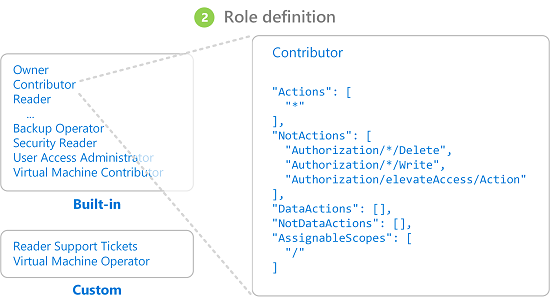
You can also create custom roles with specific permissions and assign roles. Three basic roles exist by default in Azure: owner, contributor, and reader. The owner role has full access to all resources in the assigned scope and can assign roles to other users; the contributor role can manage all resources but cannot assign roles. Readers can only view resources.
Make sure that the principle of least privilege is followed when assigning permissions to users. Failing to do so leads to users having excessive access permissions.
Lack of MFA
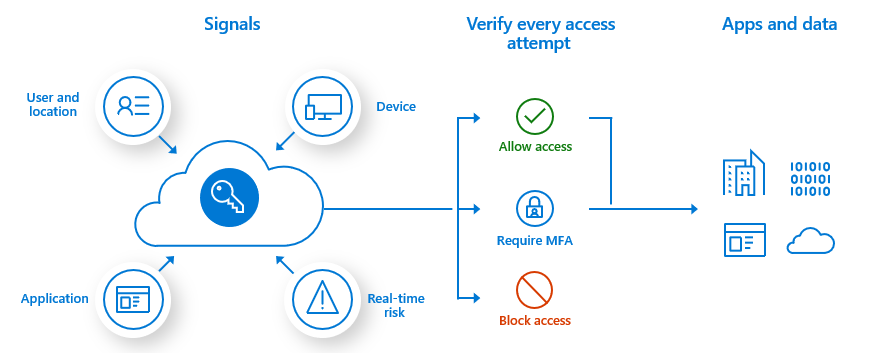
Multi-Factor Authentication (MFA) should be enabled for users and especially Azure Administrators. It provides an extra layer of security where Administrators are asked for additional authentication via methods like SMS and the Authenticator App.
The recommended way to enable and use Microsoft Entra multifactor authentication is with Conditional Access policies. Conditional Access lets you create and define policies that react to sign-in events and that request additional actions before a user is granted access to an application or service.
Guest Access Remains Enabled
Microsoft Entra ID includes the ability to support B2B collaboration, allowing you to invite people from outside your organization to be guest users in your cloud account. Until you have a business reason to do so, you should avoid this option.
As guest accounts are not typically part of your employee on-boarding/off-boarding process they can potentially lay around unnoticed indefinitely leading to potential vulnerability. Worse yet, if you do allow guest access, make sure you turn off their ability to invite other users to your cloud resources. This helps to maintain the “Need-to-Know” and inadvertent access to your data.
No Encryption of Data at Rest and In-Transit
The security of stored data should be enhanced using storage-side encryption and VM disk encryption. Azure Storage service-side encryption encrypts all data using a Microsoft platform-managed key before saving it to Azure Storage.
Azure Storage encryption is enabled for all storage accounts and cannot be disabled. By default the keys are managed by Microsoft; decide whether you need customer-managed keys.
Encryption of OS and data disks of VMs hosted in Azure is also recommended. For new VMs, use encryption at host: Azure Disk Encryption, which stores its keys in Azure Key Vault, is scheduled for retirement on September 15, 2028. Encryption status can be monitored with Microsoft Defender for Cloud.
Failure to Monitor Activity Logs
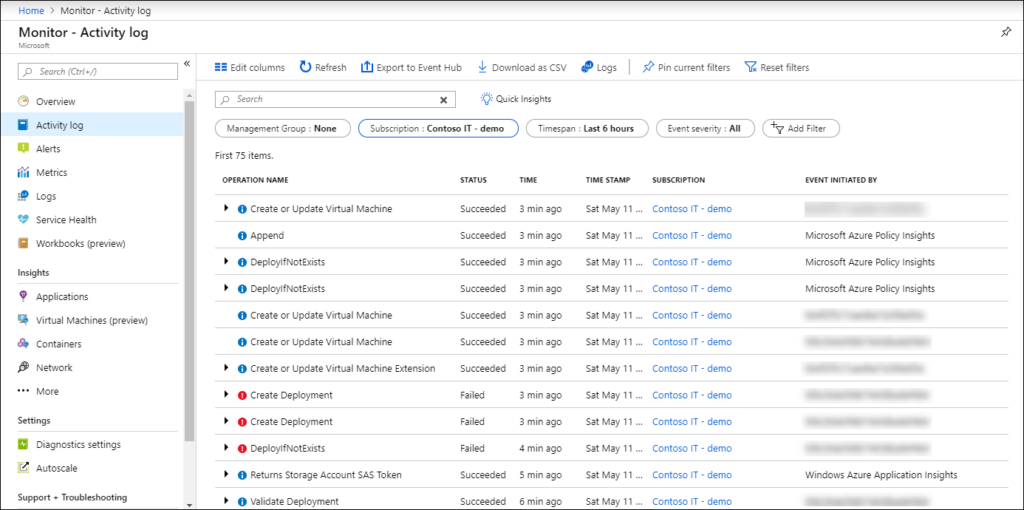
Azure Activity Log provides insight into what’s happening in your Azure subscription in terms of resource access and management. This service tracks all create, update, delete, and action activities performed on resources in the ARM model.
Network Security Groups Overly Permissive Rules
Network Security Groups (NSGs) provide the same functionality as a basic network firewall, with rules to filter the incoming and outgoing traffic from virtual networks and VMs. NSGs contain basic quintuple rules that can be configured to permit or deny traffic to or from a subnet, port or an IP in an Azure network.
You can assign NSGs at two levels: in the NIC card of VM and in subnets in VNet. Organizations often configure NSGs with broader permissions, which can invite unwanted access into their Azure environment.
Exposing Resources to the Public
Azure Blob Storage allows you to grant anonymous read-only access to data in your storage account. It is highly recommended to not provide anonymous access to blob containers until and unless it is strongly desired. You should use a shared access signature token for providing controlled and timed access to blob containers instead.