Update, October 2026: Apache’s guidance changed after this article was published. The first patch (Log4j 2.15.0) and the formatMsgNoLookups and %m{nolookups} settings proved insufficient, so the defense steps below have been updated: upgrade to a fixed release or, if you cannot upgrade straight away, remove the JndiLookup class. See Apache’s Log4j security page.
It is clear that the Log4j vulnerability is one of the most serious vulnerabilities in recent years. Many organizations have noticed a surge in internet scans to discover vulnerable systems and exploit attempts on them.
Variations of the Log4j exploit are emerging rapidly, with more than 60 in less than 24 hours as reported by Checkpoint.
On December 9th, an acute remote code execution (RCE) vulnerability was reported in the Apache logging package Log4j 2 versions 2.14.1 and below (CVE-2021-44228). Apache Log4j is the most popular java logging library with over 400,000 downloads from its GitHub project. It used by a vast number of companies worldwide, enabling logging in a wide set of popular applications.
Massive Internet Scans and Attempts to Exploit Vulnerable Systems
Companies have seen scans from thousands of IP addresses, trying to find vulnerable systems.
SophosLabs has deployed a number of IPS rules to scan for traffic attempting to exploit the Log4J vulnerability. Less than a day after it became, they saw a brief spike in traffic targeting it. Over the weekend, it began to surge, with the greatest spike coming over Saturday night and into Sunday morning (UTC).
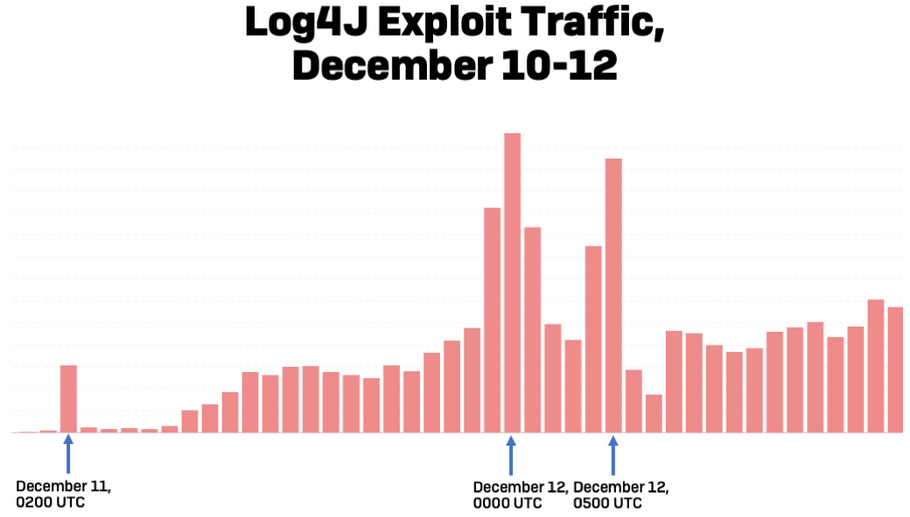
Checkpoint has prevented over 1,272,000 attempts to allocate the vulnerability, over 46% of those attempts were made by known malicious groups.
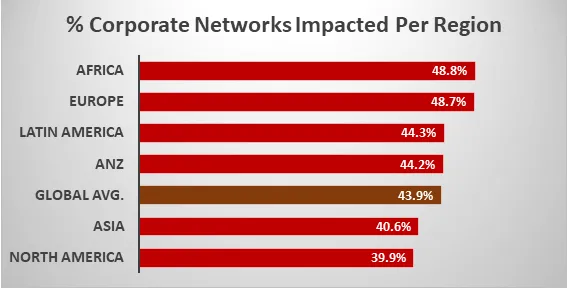
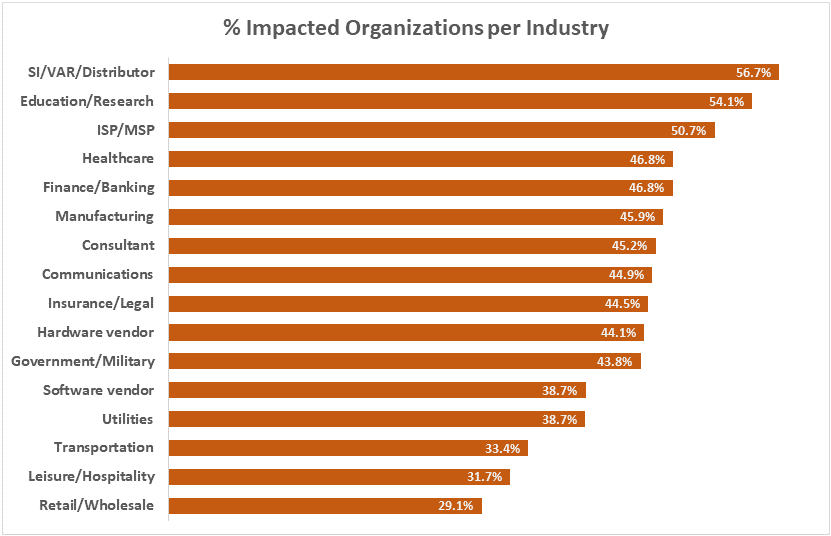
Checkpoint has published some interesting facts on the impacted geographies and the impacted organizations per industry are shown in the diagrams below.
Many Types of Malware are Being Delivered
The vulnerability in Log4j has been targeted by many attackers throughout the planet in various ways. Cryptocurrency miners, ransomware, trojans, DDoS malware amongst others are some of the malicious software the attackers are trying to deploy through the exploitation of the Log4Shell vulnerability.
Bitdefender also reported seeing attempts to deliver a new file-encrypting ransomware named Khonsari on Windows systems. The company also observed attempts to download the Orcus remote access trojan (RAT).
Sophos is already detecting malicious cryptominer operations attempting to leverage the vulnerability, and there are credible reports from other sources that several automated botnets (such as Mirai, Tsunami, and Kinsing) have begun to exploit it as well.
Identify Products Affected by the Log4j Vulnerability
Products Identified to be Affected by the Log4j Vulnerability:
- Most applications that use Java in their infrastructure
- Apache Struts
- Apache Struts2
- Apache Tomcat
- Apache Spark
- Apache Solr
- Apache Druid
- Apache Flink
- ElasticSearch
- flume
- Apache Dubbo
- Logstash
- Kafka
- IBM Qradar SIEM
- VMWare
- NetApp
- Cisco, F5
- Citrix
- Carbon Black
- Imperva
- Jenkins
- McAfee
- Oracle
- Webex
- Palo-Alto Networks
- Pulse Secure
The list keeps on growing.The list of affected applications and the list of affected components are also growing. The attack surface with verified exploits is also published by the researchers.
How the Log4j Exploit Works
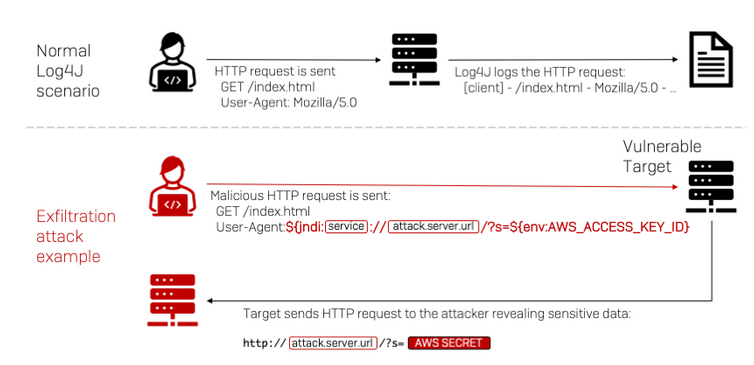
A simple diagram on how the exploit works:
How to Detect if your Systems Uses Vulnerable Log4j
Run the following command on your Linux systems
grep -r ‘org/apache/logging/log4j/core/lookup/JndiLookup.class’ /If the output is “binary file matches,” relevant files use the Log4j library.
You can run the relevant commands from the GitHub repository for Windows systems.
How to Defend Against Attacks
Upgrade Log4j to a fixed 2.x release, preferably the latest. Apache’s security page lists 2.17.0 or later (Java 8 and later), 2.12.3 (Java 7) and 2.3.1 (Java 6) as fixing CVE-2021-44228 and the follow-on flaws CVE-2021-45046 and CVE-2021-45105. The first patch, Log4j 2.15.0, was incomplete, and the formatMsgNoLookups and %m{nolookups} settings do not mitigate CVE-2021-45046.
If you cannot upgrade straight away:
- Remove the JndiLookup class from the log4j-core jar (for example,
zip -q -d log4j-core-*.jar org/apache/logging/log4j/core/lookup/JndiLookup.class). - Consider blocking LDAP and RMI outbound traffic to the internet from vulnerable servers.
The best way to defend yourself against cyber attacks is to employ a defense in depth strategy within your organization.